/proc but for the browser. This is an excellent idea, because now I can run all the tools that I am already familiar with on my tabs!As I was reading through the TabFS page (linked above), I thought to myself: "this is so much RC energy!". So I checked, and lo and behold, Omar Rizwan is an RC Alum :D
Why I wanted something like TabFS
The internet is full of interesting stuff that hijacks my attention. I end up getting completely distracted from my planned tasks. My solution to this is: I open all the links I want, but I don't read anything immediately. Instead, I capture the link in Org-Mode and schedule it for later (generally tomorrow). This way, when I am planning the day, I have a bunch of links in my Agenda. I choose which ones I want to read on any given day and defer / delete the rest. I use the excellent Bulk Scatter tool built into Org Agenda for this.
I thought: Why do this manually? Enter TabFS
A small Babashka script
With TabFS installed, it was a small step to go from there to org-mode. My go-to scripting tool is Babashka. Here is the meat of the code:
(require '[babashka.fs :as fs]
         '[clojure.string :as cs])

(defn build-tab-info
  "Collects the title and URL for all open tabs using TabFS."
  [opts]
  (map (fn [t]
         {:title (first (fs/read-all-lines (str t "/title.txt")))
          :url (first (fs/read-all-lines (str t "/url.txt")))})
       (fs/list-dir (:tab-dir opts))))

(def plain-text-template
  "The template for creating the org-mode plain-text entry. Placeholders
are for the following items (in order):
  1. Org-Mode Heading level: default value is 1.
  2. URL of the link to the stored.
  3. Title of the link to be stored.
  4. Date when the Tab is scheduled for reading: default is tomorrow.
  5. Date when the Tab was captured."
  "%s TODO [[%s][%s]]\nSCHEDULED: %s\n%s")

(defn tabs->text
  "Convert the list of open tabs to a wall of text that can be stored in
  Plain-Text."
  [opts]
  (->> (build-tab-info opts)
       (map (fn [t]
              (format plain-text-template
                      (apply str (repeat (:org-mode-heading-level opts) "*"))
                      (:url t)
                      (:title t)
                      (:scheduled-on opts)
                      (:captured-on opts))))
       (cs/join \newline)))
I wrote a CLI script for the code, here is what the help command looks like:
✦ ➜ bb-plain-text-tabs --help
Convert all open tabs to plain text Org Mode format. Optionally, close the open tabs.

Usage: bb-plain-text-tabs [options]

Options:
  -fs,  --tabfs-mnt-path                *REQUIRED* TabFS mount path. The path on the filesystem where TabFS is mounted.
  -hl,  --org-mode-heading-level        1                            The heading level at which link headings will be stored in Org Mode.
  -s,   --scheduled-on           <date> tomorrow                     Date on which to schedule reading this batch of links, in yyyy-MM-dd format.
  -del, --delete-tabs            <del>  false                        Boolean value to indicate if browser tabs should be closed

Examples:
   bb-plain-text-tabs -fs <TabFS Mount Path> # Convert Open Tabs to Plain Text
   bb-plain-text-tabs -fs <TabFS Mount Path> --delete-tabs # Delete tabs and print plain text
   bb-plain-text-tabs -fs <TabFS Mount Path> | tee tabs.org # Capture Plain Text output to file
What it looks like
Finally, this is the output, in Org Mode:
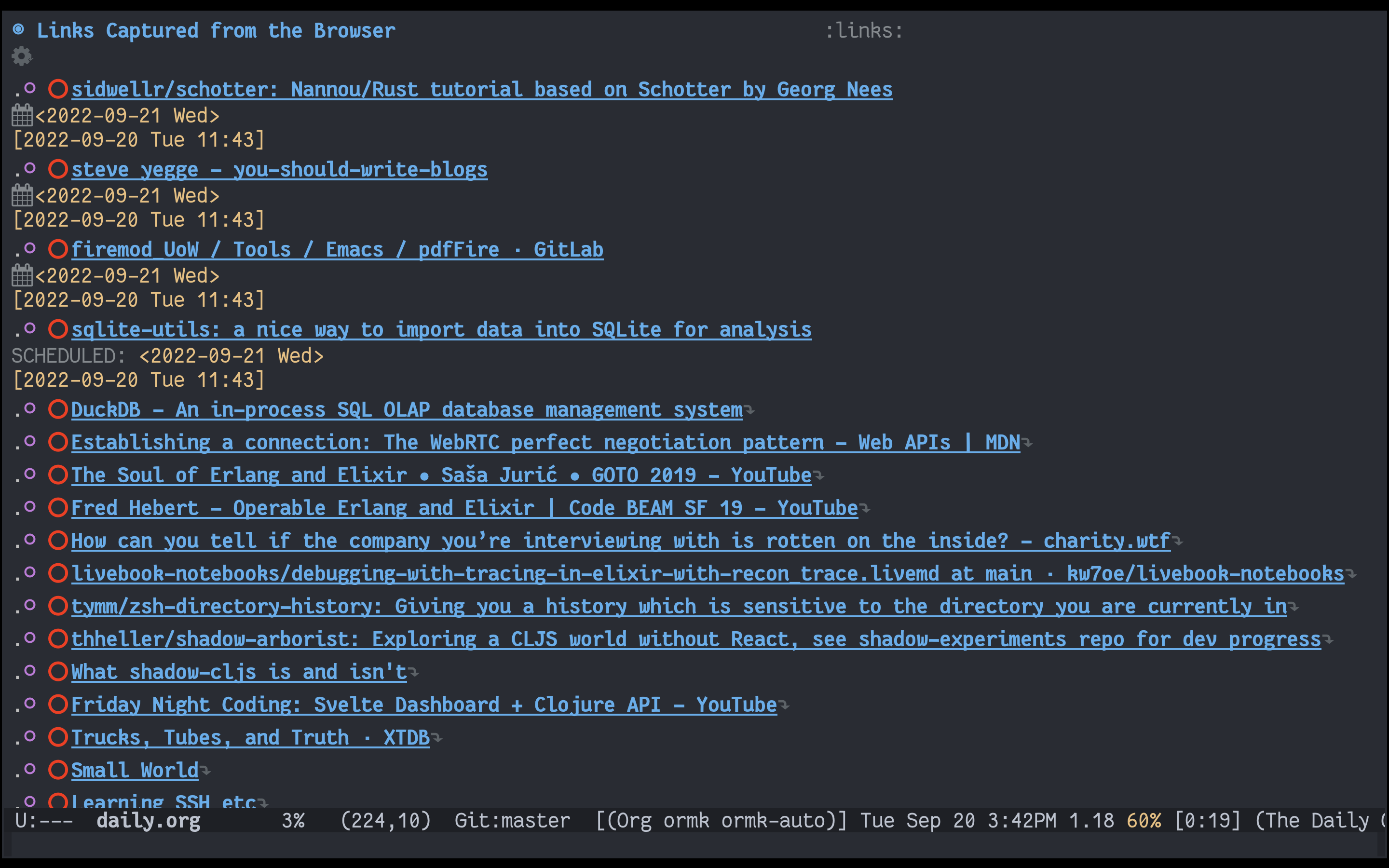
I hope all the Emacs/Org-mode folks reading this find it useful! Thank you to Omar for the excellent TabFS tool!
]]>